AdBlocker Ultimate for Mac

Browse the Internet ad-free on your Mac

A superior ad-blocking macOS application that works in every browser and every app on your Mac, not just Safari.

Blocks ads in all applications, not just in browsers
Stops tracking of your online activity and protects privacy
Blocks phishing pages and malicious websites
Faster browsing by eliminating ads before they load
Reduces CPU and network usage, extends battery life on MacBooks
14-day free trial*

Powerful Ad Protection

AdBlocker Ultimate protects every app on your Mac, not just your browser
System-Level Blocking

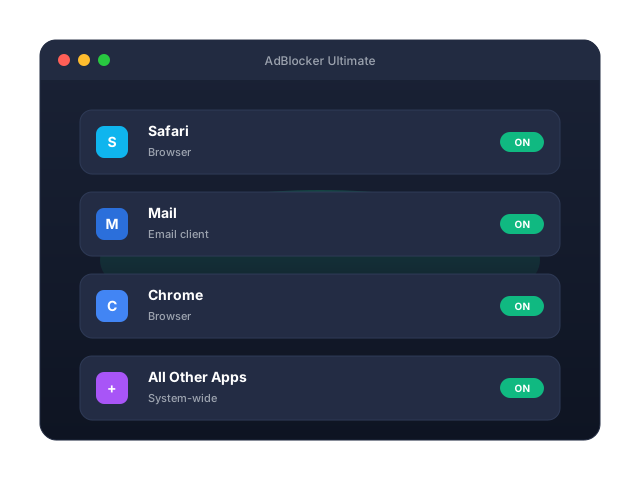
AdBlocker Ultimate for Mac runs as a macOS Network Extension and filters traffic system-wide. It blocks ads in every app on your Mac, not just in your browser - no per-browser extensions to install.

Blocking in All Applications

Removes ads from browsers, email clients, media players, chat apps and more

Advanced Filters

Uses intelligent filter lists to identify and block every type of ad

Complete Control

Customize blocking, set per-app rules, and create exceptions and allowed websites

System-wide blocking on Mac

Privacy Protection

Protect your privacy by blocking trackers and analytics that build a profile of your online behaviour.

Tracker Blocking

Stops tracking modules that follow you across the web

Digital Fingerprint Prevention

Disrupts techniques used to build a unique profile of your device

Privacy Mode

Access advanced tracking protection features and dedicated privacy filter lists

Privacy protection on Mac

Enhanced Performance

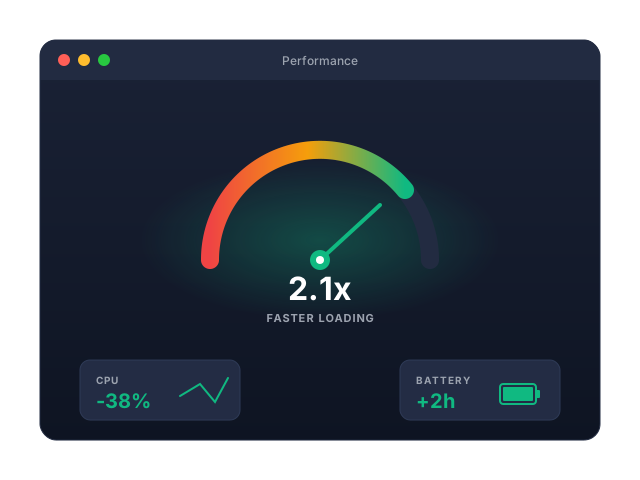
Enjoy faster browsing and a snappier Mac. Ad blocking reduces CPU and memory usage and saves on mobile hotspot and data usage.

Faster Loading

Pages and apps load noticeably faster without ads

Battery-Friendly

Lower CPU and network work means longer battery life on MacBook Air and MacBook Pro

Data Savings

Save on your monthly traffic by not loading unnecessary ads

Performance benefits on Mac

Increased Security

Protect yourself from malicious ads, phishing attacks, and other online threats.

Malicious Domain Blocking

Automatically blocks known malicious websites and ad networks

Phishing Protection

Protects against phishing ads and sites that try to steal your data

Safe Downloads

Prevents known malicious scripts from running on pages you visit

Security features on Mac

How AdBlocker Ultimate works on macOS

Unlike browser extensions, our Network Extension protects every app on your Mac

Internet Traffic with Ads

All traffic containing ads, trackers, and threats first passes through AdBlocker Ultimate before reaching any app on your Mac.

Multi-Layer Protection

Our sophisticated protection system analyzes and filters all traffic through multiple specialized layers.

Network Filtering

Blocks connections to ad servers before they load

DNS Protection

Prevents connections to malicious domains

HTTPS Filtering

Securely inspects encrypted connections using a locally-installed trusted root certificate

Content Filtering

Removes ad elements from pages and apps

AdBlocker Ultimate installs a Network Extension and a trusted root certificate into the System keychain to securely filter all traffic, including HTTPS. No kernel extensions or third-party drivers are installed.

Clean Traffic Only

Only clean, ad-free, safe content reaches your apps. All ads, trackers, and threats are completely removed.

Ad-Free Content No Trackers Safe Browsing Privacy Protected

All Your Applications

Works across Safari, Chrome, Firefox, Edge, Brave, Opera, Arc, Vivaldi, Tor Browser, email clients, media players, games and messaging apps.

Browsers
Mail
Messaging
Media Players
Games

The Results

No Ads

Eliminate pop-ups, banners, video ads and other ad content across every app.

No Trackers

Block scripts that monitor your behaviour.

Faster Loading

Pages and apps load significantly faster.

Complete Privacy

Your online activity stays private.

Enhanced Security

Protection from malicious ads and phishing.

Longer Battery Life

Lower CPU and network usage on MacBooks.

What Our Customers Say

Real reviews from satisfied Mac users worldwide

Daniel Brooks

After switching, ads disappeared across Safari and the apps I use daily. My Mac feels faster and far less distracting.

Creative Director

Sofia Marku

I wanted one blocker for my whole Mac, not browser add-ons everywhere. Setup was quick, and it just works in the background.

Project Manager

Liam Carter

Streaming is smoother, pages load cleaner, and I do not need to manage settings in every browser. Exactly what I needed.

Small Business Owner

AdBlocker Ultimate for Mac vs Browser Extension

Compare our system-level Mac app with a browser-based ad blocking extension

FeaturesAdBlocker Browser ExtensionAdBlocker Ultimate for Mac
Blocks ads and trackers in your browser
Malware domain blocking
Blocks YouTube in-video ads
Blocks ads in all applications
System-wide tracker blocking
Advanced privacy protection
Works in all browsers simultaneously
Works in desktop applications
Works in email clients
Blocks ads in games
Individual application whitelisting
Real-time filter updates
Premium support
Learn moreBuy Now

Frequently Asked Questions

Answers to the most common questions about AdBlocker Ultimate for Mac

System Requirements

AdBlocker Ultimate for Mac is designed to run efficiently on all modern Macs

Minimum Requirements

  • OS: macOS 13+
  • Architecture: Apple Silicon (arm64)
  • RAM: 512 MB available; Disk: 200 MB free space
  • Network Extension approval and trusted root certificate approval (one-time, during first launch)
  • Internet connection required for filter list and security updates

Experience an ad-free Mac today

Join users who enjoy faster browsing, real privacy, and a cleaner digital experience across every app on their Mac.